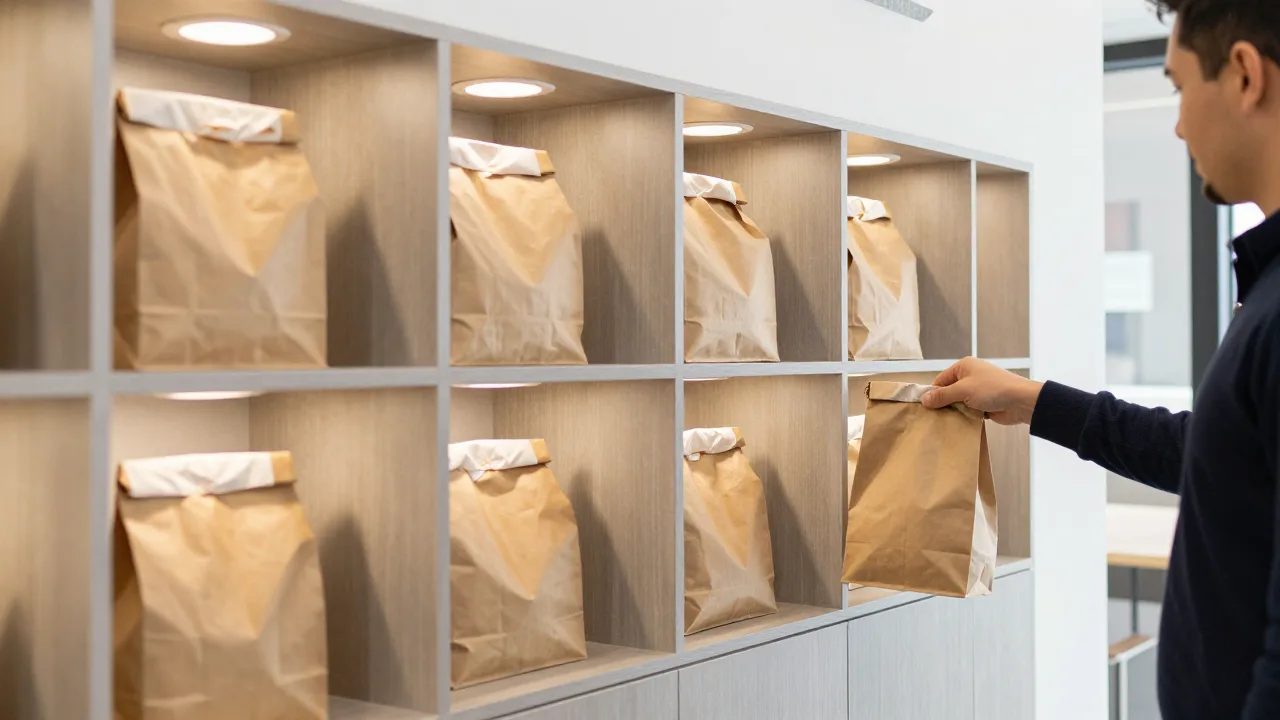
A pickup locker is a bank of individually locking compartments, usually mounted in a lobby or on an exterior wall, where a restaurant stores completed to-go orders until the customer collects them. Each order goes in one compartment, the guest gets a unique code by text, and entering that code pops open exactly one door. No counter conversation, no name-calling, no shelf-rummaging.
That's the whole idea in three sentences. The reason it's worth another 2,000 words is that the mechanics underneath — temperature zones, code lifecycles, load-in workflow, and the math on when a locker actually beats a labeled shelf — decide whether the thing becomes an operational upgrade or an expensive coat rack.
Lockers have been standard in parcel logistics for a decade. Food is harder. A package doesn't get soggy, doesn't have a temperature-safety window, and doesn't need to be handed off within twelve minutes of being made. So a food pickup locker isn't just a smart mailbox — it's a piece of kitchen equipment with a network connection. Let's take it apart.
What's Actually Inside a Pickup Locker System
Strip the marketing away and every unit on the market is four things bolted together.
The cabinet. Anywhere from four to thirty-two compartments, typically 12″ to 18″ wide and 14″ to 20″ deep. Depth matters more than operators expect: a 16″-deep cubby will not swallow a stacked pair of large pizza boxes or a tall drink carrier, and undersized compartments are the single most common regret after installation.
The lock and sensor layer. Solenoid latches on each door plus an occupancy sensor that tells the system which compartments are free. Better units add a door-ajar alarm and a weight or infrared sensor that confirms the bag actually left when the door closed.
The temperature system. Ambient compartments are just insulated boxes. Heated compartments hold around 140–160°F using low-wattage radiant elements. Refrigerated compartments run 34–40°F for salads, sushi, cold-pressed juice, and dessert. Mixed-zone walls give you some of each, which is what most full-menu restaurants actually need.
The software. This is the part that matters most and gets evaluated least. The controller has to receive the order from your POS or online ordering system, assign a compartment, generate and text a code, expire that code on a timer, unlock on demand, and log every event. A locker with mediocre software is a locker your staff will stop using inside a month.
Buy the cabinet for the food you actually sell, but choose the vendor for the software. Steel lasts ten years; a clumsy load-in workflow gets abandoned in five weeks.
The Handoff, Step by Step
Here's the full lifecycle of one order through a locker, because the details are where the friction hides.
- Order lands. The guest orders online, by phone, or through a marketplace app, and selects pickup. Your system quotes a ready time.
- Kitchen fires and finishes. Expo bags the order and prints or scans the ticket label.
- Load-in. A staff member scans the ticket barcode at the locker screen. The system picks an open compartment of the right temperature type, that door opens, the bag goes in, the door closes. Elapsed time: eight to twelve seconds.
- Notification fires. The customer gets a text: order ready, locker number, and a four-to-six digit code. This is the same trigger point that drives every good customer pickup notification system — the locker just gives the message something concrete to point at.
- Retrieval. Guest arrives, taps the screen, enters the code, one door pops. Sensor confirms the compartment is empty and releases it back into the pool.
- Escalation. If the order sits past a threshold — most operators set 20 to 30 minutes — the system nudges the customer again and flags the order on the manager dashboard.
Step six is the sleeper feature. A locker turns the vague problem of uncollected takeout orders into a timestamped, per-compartment record, so you finally know how many orders go cold, which channels they come from, and what daypart they cluster in.
Heated, Ambient, or Refrigerated: Getting the Mix Right
Choosing your compartment mix is the decision that most affects daily satisfaction, and it's driven entirely by your menu.
| Zone | Holding Range | Best For | Practical Limit |
|---|---|---|---|
| Heated | 140–160°F | Entrées, pizza, sandwiches, fried items | Keeps food safe, not crisp — 15–20 min |
| Ambient | Room temperature | Baked goods, chips, packaged retail, drinks in carriers | Anything hot loses 25°F in 10 min |
| Refrigerated | 34–40°F | Salads, sushi, poke, desserts, cold beverages | Highest cost per compartment |
Here's the honest caveat vendors bury: heated does not mean fresh. A 155°F cubby holds food out of the danger zone, but fried food still goes limp in about eight minutes and steam still wilts a sandwich. The locker extends your safe window, not your good window. Everything you already know about to-go food quality preservation — vented containers, separating wet from crisp, holding sauces on the side — matters more inside a locker, not less, because nobody is watching the bag.
A workable default for a full-menu restaurant doing 100+ to-go orders a day: about 60% heated, 25% ambient, 15% refrigerated. Drink-forward and grab-and-go concepts flip that ratio hard toward refrigerated and ambient.
What Pickup Lockers Cost in 2026
Pricing is all over the map, but the bands are reasonably stable.
| Configuration | Typical Installed Cost | Software / Month |
|---|---|---|
| 4–6 ambient cubbies, countertop | $3,500–$7,000 | $40–$80 |
| 8–12 door heated wall | $9,000–$18,000 | $75–$150 |
| 16–24 door mixed-temperature wall | $20,000–$35,000 | $120–$250 |
| Exterior/drive-up rated unit | Add 25–40% | Same |
Budget for three things the quote usually excludes: a dedicated 20-amp circuit (heated walls draw real power), millwork or wall reinforcement, and roughly $600–$1,500 of integration work if your POS and the locker vendor don't already speak to each other. That integration line is where projects quietly stall — confirm it in writing before you sign.
The Volume Where a Locker Starts Making Sense
Let's do the arithmetic honestly, because a locker is not a small purchase and the payback is mostly labor.
A counter handoff costs about 45 to 90 seconds of staff attention once you count the interruption, the name lookup, the shelf search, and the goodbye. Call it a conservative 60 seconds. At 80 to-go orders a day, that's 80 minutes of front-of-house time — roughly 1.3 labor hours. At a loaded $19/hour, you're spending about $9,000 a year handing bags across a counter.
A locker doesn't eliminate that entirely; load-in still costs ten seconds. But it converts a reactive interruption into a batched, predictable task, and it typically recovers 60–70% of those minutes. On a $12,000 unit, that's a two-to-three-year payback from labor alone — before you count the orders you stop losing to lobby congestion.
Which gives you a rough decision rule:
- Under 60 to-go orders/day: skip it. A well-organized shelf, clear signage, and reliable ready texts solve the same problem for under $500. Read up on pickup area design first and fix the layout.
- 60–120 orders/day with a crowded lobby: a locker is a legitimate candidate, especially if takeout guests physically block your dine-in line.
- 120+ orders/day, or a heavy marketplace-driver mix: a locker is close to a no-brainer, and mixed-temperature is worth the premium.
- Ghost kitchen or delivery-first: lockers plus a driver-only entrance is arguably the cleanest handoff design that exists.
Lockers also pair naturally with curbside. Many operators run both: the wall handles walk-ins and drivers, while a curbside lane covers guests who won't leave the car. If you haven't built that side out yet, the mechanics of a proper curbside pickup workflow are worth mapping before you commit to a locker footprint, since the two systems share the same ready-time and notification plumbing.
Example scenario: Kettle & Rye, Columbus
Illustrative scenario — a composite example built to show how the numbers work. It does not describe a real business or customer.
Kettle & Rye, a 78-seat fast-casual doing about 135 takeout orders daily, installed a 16-door mixed-temperature wall in March 2026 for $23,400 plus $140/month in software. Before install, their front counter averaged 4.2 people queued at 6:15 p.m., and staff logged an average of 71 seconds per handoff. Ninety days later, average peak queue dropped to 1.4, handoff labor fell to 22 seconds of load-in, and third-party driver dwell time in the lobby went from 3.8 minutes to 40 seconds. Measured labor recovery came to roughly $7,800 annualized, and dine-in ticket count during the 6–7 p.m. hour rose 11% once the counter stopped being blocked. Their own estimate: payback in about 28 months, faster if they count the dine-in lift.
Installing Without Wrecking Your Lobby
A locker fails operationally more often than it fails mechanically, and it's almost always about placement. Four rules worth following:
Put it on the guest's natural path, not in a corner. If a customer has to ask where the lockers are, you've lost the labor savings. Line of sight from the door is the standard.
Give it its own approach lane. The whole point is decoupling takeout traffic from the ordering line. If the locker sits behind the queue, it's decorative.
Load from the back if you can afford it. Pass-through units let staff load from the kitchen side while guests retrieve from the lobby side. It costs more and it's worth it — it keeps runners out of the customer flow completely.
Sign it like an airport. "Order Pickup — Enter Your Code" in large type above the unit, plus a floor decal. Assume zero prior knowledge from a first-time guest.
One more thing: the locker only performs as well as the order data feeding it. If your ready times are guesses and your ticket routing is manual, a locker just adds an expensive step. The payoff shows up when a genuine automated ordering system pushes the order straight through to fulfillment, so compartment assignment and the pickup code fire the instant expo bumps the ticket. Locker plus manual re-entry is the worst of both worlds.
The Five Numbers to Watch After Go-Live
Once the wall is in, these metrics tell you whether it's earning its keep:
- Median dwell time (load-in to retrieval). Under 6 minutes is healthy. Climbing past 12 means your ready-time quotes are running early.
- Compartment utilization at peak. If you're above 85% during the dinner rush, you're one bad night from having nowhere to put food.
- Locker bypass rate. The share of to-go orders staff still hand over the counter. Above 20% means something in the workflow is broken — usually oversized packaging.
- Code-failure contacts. How often guests need staff help to open a door. Should trend under 3% after week two.
- Abandoned-in-locker count. Now measurable to the minute, which turns your no-show problem from a guess into a managed number.
Track those weekly for the first quarter. Nearly every locker disappointment traces back to one of them going unwatched — most often utilization, because operators size the cabinet for today's volume instead of the volume they're buying the locker to enable.
So: a pickup locker is not magic, and it isn't a substitute for accurate timing or good packaging. It's a labor-shifting device that turns your busiest, most interruption-prone thirty seconds into a self-service transaction. Get the size, the temperature mix, and the software right, and it quietly gives your counter staff their evening back.
Frequently Asked Questions
How much does a restaurant pickup locker cost?
Do pickup lockers keep food hot?
What size restaurant actually needs a pickup locker?
How do customers open a pickup locker?
Can a pickup locker work for delivery drivers too?
Make the Handoff the Easiest Part of Your Night
KwickOS connects online ordering, kitchen display, ready notifications, and pickup hardware in one flow — so compartment assignment and the customer's code fire the moment expo bumps the ticket.
Try KwickOS free — 5,000+ restaurants trust usSell Off-Premise Technology in Your Market
KwickOS resellers earn recurring margin helping independent restaurants modernize pickup, ordering, and notifications.
Become a Reseller